AI photo editing is evolving rapidly in 2026, and one of the most viral trends right now is the Butterfly Effect AI Photo Editing Prompts. This creative editing style combines cinematic visuals, symbolic transformation, and emotional storytelling into a single image. With the help of ChatGPT and AI tools, users can now create stunning edits that look professional—even on mobile devices.
In this article, you’ll learn exactly what it is, why it’s trending, and how to make it using simple prompts.
What is Butterfly Effect AI Photo Editing Prompt?
Understanding the Concept
The Butterfly Effect AI Photo Editing Prompt is a creative editing style inspired by the idea that small changes can create big visual transformations. In photo editing, this means turning a normal image into a dramatic, artistic masterpiece using AI prompts.
Key Features
- Cinematic lighting and effects
- Butterfly elements (symbol of change)
- Glowing particles and dreamy background
- Emotional and storytelling visuals
This trend is popular on platforms like Instagram, TikTok, and YouTube Shorts, where creators use AI-generated prompts to produce eye-catching edits.
Why is Butterfly Effect AI Photo Editing Trending in 2026?
1. Viral Social Media Appeal
This editing style instantly grabs attention because of its unique and magical look. People love sharing visually powerful images.
2. Easy with AI Tools
You don’t need professional editing skills. With ChatGPT prompts and AI apps, anyone can create high-quality edits on mobile.
3. Emotional Storytelling
Butterflies symbolize transformation, freedom, and beauty. This adds a deeper meaning to images, making them more engaging.
4. Perfect for Personal Branding
Content creators use this trend to stand out and build a strong visual identity online.
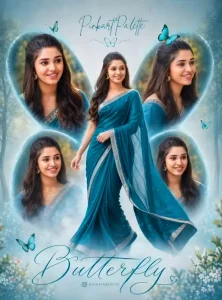
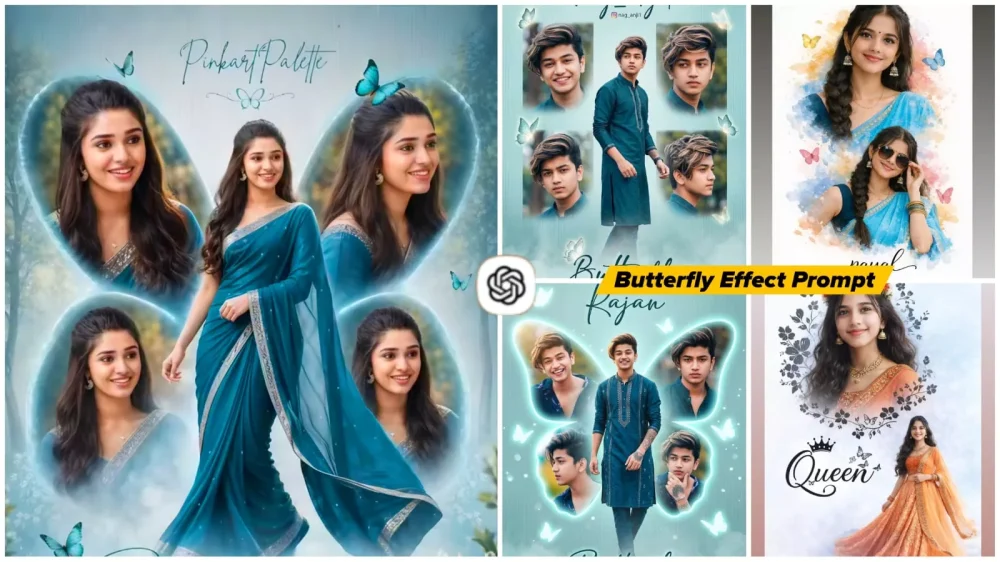
Create a high-resolution, cinematic butterfly-themed collage poster of a young South Indian woman.Name : LoveUse the uploaded image as the exact face reference (strict face preservation - 100% identical facial features, skin tone, hairstyle, expression, no changes at all). The design should feature:A large central full-body image of the woman wearing a traditional saree (deep teal/blue tone with silver border), standing gracefully and slightly twirling theSurrounding her, include 4 smaller portrait shots (close-up angles, smiling, side poses) arranged symmetrically in a butterfly wing shape.Add soft feathered edges around the smaller images to blend into the background. Background:Soft pastel teal/blue gradient background with subtle vertical texture lines. Light mist/fog effect at the bottom.Slight nature touch (blurred trees or greenery in background for depth).Styling:Elegant, dreamy, and feminine aesthetic. Soft natural lighting with smooth skin tones.Add subtle glow and depth of field.Typography:Add a stylish cursive title text at the bottom: "Butterfly" Add a name at the top in elegant handwritten font.Include a small Instagram-style username below.Quality:Ultra HD, 4K resolutionSharp focus, professional photo manipulation Poster design, studio-quality finish--ar 3:4 --v 6 --style raw Create a high-resolution, cinematic butterfly-themed collage poster of a young South Indian woman.Name : nag_anji1Use the uploaded image as the exact face reference (strict face preservation - 100% identical facial features, skin tone, hairstyle, expression, no changes at all). The design should feature:A large central full-body image of the woman wearing a traditional saree (deep teal/blue tone with silver border), standing gracefully and slightly twirling theSurrounding her, include 4 smaller portrait shots (close-up angles, smiling, side poses) arranged symmetrically in a butterfly wing shape.Add soft feathered edges around the smaller images to blend into the background. Background:Soft pastel teal/blue gradient background with subtle vertical texture lines. Light mist/fog effect at the bottom.Slight nature touch (blurred trees or greenery in background for depth).Styling:Elegant, dreamy, and feminine aesthetic. Soft natural lighting with smooth skin tones.Add subtle glow and depth of field.Typography:Add a stylish cursive title text at the bottom: "Butterfly" Add a name at the top in elegant handwritten font.Include a small Instagram-style username below.Quality:Ultra HD, 4K resolutionSharp focus, professional photo manipulation Poster design, studio-quality finish--ar 3:4 --v 6 --style raw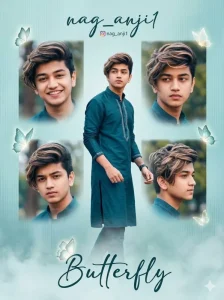
Create a high-resolution, cinematic butterfly-themed collage poster of a young South Indian man.
Use the uploaded image as the exact face reference (strict face preservation - 100% identical facial features, skin tone, hairstyle, expression, no changes at all).
The design should feature:
A large central full-body image of the man wearing a stylish traditional outfit (deep teal/blue kurta or modern ethnic suit with subtle silver detailing), standing confidently and slightly walking or turning pose (natural masculine posture).
Surrounding him, include 4 smaller portrait shots (close-up angles, smiling, serious look, side profile) arranged symmetrically in a butterfly wing shape.
Add soft feathered edges around the smaller images to blend smoothly into the background.

Background:
Soft pastel teal/blue gradient background with subtle vertical texture lines.
Light mist/fog effect at the bottom.
Slight nature touch (blurred trees or greenery in background for depth).

Enhance with subtle glowing butterflies around the composition (not too feminine, keep it elegant and aesthetic).

Styling:
Elegant, cinematic, slightly masculine aesthetic.
Soft natural lighting with realistic skin tones.
Add subtle glow, depth of field, and sharp focus.
Keep overall look stylish and premium (not overly soft/feminine).

Typography:
Add a stylish cursive title text at the bottom: "Butterfly"
Add a name at the top in elegant handwritten font: "nag_anji1"
Include a small Instagram-style username below.

Quality:
Ultra HD, 4K resolution
Sharp focus, professional photo manipulation
Poster design, studio-quality finish
--ar 3:4 --v 6 --style raw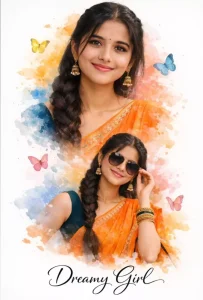
"A beautiful double exposure cinematic portrait of a young Indian woman with a long thick braid, wearing a vibrant orange silk saree with an embroidered border and a dark teal blouse. The image features two poses: one looking directly at the camera with a gentle smile and traditional jhumka earrings, and another smaller silhouette where she is wearing stylish sunglasses. The background is a white canvas with artistic watercolor splashes in shades of orange, blue, and yellow, decorated with colorful 3D butterflies. At the bottom, the text 'Dreamy Girl' is written in an elegant black cursive font. Soft studio lighting, high resolution, 8k, realistic textures."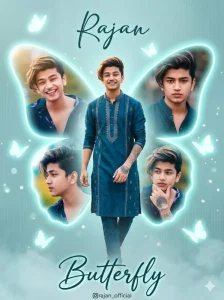
Create a high-resolution, cinematic butterfly-themed collage poster of a young South Indian man.
Use the uploaded image as the exact face reference (strict face preservation - 100% identical facial features, skin tone, hairstyle, expression, no changes at all).

Main Composition:
Create a large glowing butterfly-shaped frame in the background (soft neon teal/blue glow).
The butterfly wings should act like photo frames.
Inside the butterfly wings:
Place 4 smaller portrait images of the same man (close-up, smiling, side profile, serious look).
Each image should fit naturally inside the wing curves.
Edges should be soft, feathered, and slightly glowing to blend smoothly.

Center Subject:
Add a large full-body image of the man in front of the butterfly shape.
He should be wearing a stylish traditional outfit (deep teal/blue kurta or ethnic suit with silver detailing).
Pose: confident, slightly walking or turning pose with natural masculine posture.

Background:
Soft pastel teal/blue gradient background.
Subtle vertical texture lines.
Light fog/mist at the bottom.
Add slight blurred greenery or outdoor bokeh for depth.

Effects:
Add soft glowing butterflies around the composition.
Use light particles, dreamy glow, and depth of field.
Keep the look cinematic and slightly masculine (not overly soft).

Lighting:
Soft natural lighting with slight golden highlights.
High contrast with smooth skin tones.

Typography:
Top: elegant handwritten font → "Rajan"
Bottom: stylish cursive text → "Butterfly"
Add small Instagram-style username below.

Quality:
Ultra HD, 4K resolution
Sharp focus, professional photo manipulation
Poster design, studio-quality finish
--ar 3:4 --v 6 --style raw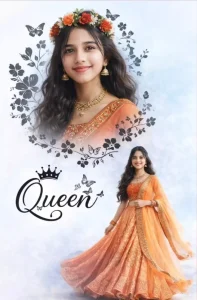
A beautifuldouble exposure portrait of a vounS Indian sirl with long wavy hair. In the top half, a close-up profile of her face smiling, wearing a floralcrown of red and oranse flowers and traditional éold iewelry (ihumkas and necklace). In the bottom half, a full-body shot of her wearing a vibrant orange embroidered lehenga choli, standing gracefully. The background is a soft, dreamy light blue and white textured sky. Eledant black floral vines and butterfly silhouettes frame the top portrait. Between the two images, stylish black cursive text reads "Queen" with a smallcrownicon on top. Cinematic lighting, highresolution, 8k, ethnic desi aesthetic.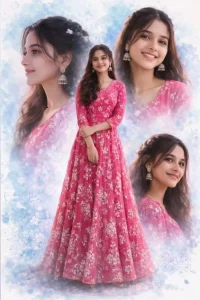
A high-quality digital collage of a beautiful Indian girl featuring one full-length center shot and three different close-up facial portraits in the background. She is wearing a vibrant pink floral embroidered Anarkali gown. Her hair is styled in soft waves with small floral accessories. She is wearing traditional silver jhumka earrings. The background is a dreamy, artistic watercolor splash in shades of light blue and white with subtle floral patterns. The lighting is soft and cinematic, with an ultra-realistic 8K finish and a professional photography look.How to Make Butterfly Effect AI Photo Editing Prompts?
Step-by-Step Guide
1. Choose Your Image
Pick a clear portrait photo with good lighting. A simple background works best.
2. Use AI Editing Apps
You can use tools like:
- ChatGPT (for prompt creation)
- AI photo editors (Remini, Lightroom, PicsArt AI)
3. Create the Perfect Prompt
Here is a powerful example prompt:
Prompt:
“Create a cinematic butterfly effect photo of a person standing still, glowing butterflies flying around, soft golden light, dreamy background, ultra HD, shallow depth of field, emotional and magical atmosphere, 8K realistic detail”
4. Apply Effects
- Add glowing butterflies
- Use blur for background (bokeh effect)
- Adjust brightness and contrast
- Add light rays and particles
5. Enhance Final Look
Sharpen the image, improve skin texture, and keep colors natural for a professional finish.
Pro Tips for Best Results
- Use high-resolution images
- Keep prompts detailed but clear
- Focus on lighting and depth
- Avoid over-editing
Conclusion
The Butterfly Effect AI Photo Editing Prompts trend in 2026 is a perfect mix of creativity and technology. It allows anyone to turn ordinary photos into extraordinary visual art using simple prompts. Whether you are a beginner or a content creator, this trend is a must-try for creating viral and engaging content.
FAQs
1. What is Butterfly Effect AI Photo Editing?
It is a trending AI editing style that transforms normal photos into cinematic images using butterfly elements and dramatic effects.
2. Why is it popular in 2026?
Because it is visually stunning, easy to create with AI tools, and perfect for social media content.
3. How can I create Butterfly Effect edits on mobile?
Use AI apps like PicsArt or Lightroom, generate prompts with ChatGPT, and apply effects like glowing butterflies, blur, and lighting adjustments.