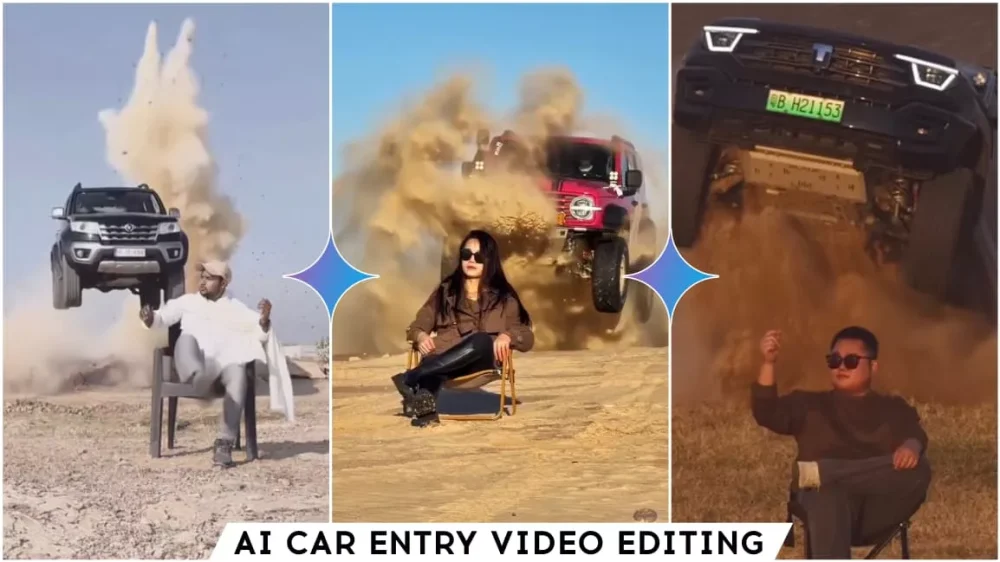
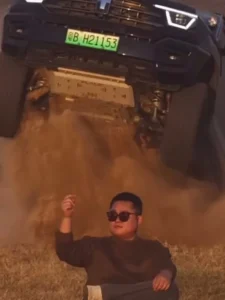
Trending Car Entry Ai Video Editing Prompt – Instagram trends are constantly changing, but I’ve noticed a particular trend: videos featuring this kind of entrance are going viral. I’ll show you how you can create a similar viral video for yourself, step by step. Actually, I should mention that the original video was created and recorded using a camera. However, since we don’t have that equipment, we’ll use a different approach. We’ll create our video using AI, and this will give us excellent results. Let me explain the entire process and how you can follow these steps to create a great video.
Details Of Trending Car Entry Ai Video Editing Prompt
In this editing tutorial, we’ll create a video featuring a car entry. We’ll be sitting on a chair in the desert, and our car will drive in from behind. Now, this is a slightly different scenario because many people don’t own a car, and many want to create a video with their favorite car. I’ve provided both options here. You can create a video with any car you want. It will be very simple. You just need to change the car – simply change the car’s name, and a video with a different car will be ready. I’ll explain everything; just follow the steps. First, we’ll create an image, and then we’ll convert that image into a video. We’ll also explain which tools to use and how to create it.
Editing Process
In this process, we will use two AI tools. First, we will use Google Gemini. You should have access to it, and we will create both the photo and video using Google’s website. What happens is, first we generate the photos because we don’t usually have photos of ourselves sitting on a chair in the desert with the desert in the background. If you have such a photo, you can use it. If not, even a photo of you simply sitting on a chair will work. After that, you will have to perform the second step, the video creation process, because we will be converting the image to a video, and that also requires a prompt. I have shared both prompts here and also explained the process. You can follow those instructions.
Trending Car Entry Stunt Ai Video Editing Prompt
Use the uploaded reference image as the ONLY identity reference for the person. Replace the person in the reference video with this person while preserving their exact identity and appearance throughout the entire video.IDENTITY LOCKPreserve the exact facial structure, eyes, nose, lips, jawline, skin tone, age, natural proportions, and visible hair characteristics.No face redesign, beautification, morphing, identity drift, or face-swap artifacts.Keep the same person consistently in every frame.Preserve natural gender presentation and clothing unless required by the original video.VIDEO MATCH
Recreate the approximately 12-second reference video as closely as possible. The reference video controls the action, timing, camera, environment, and composition; the reference image controls only the person's identity and appearance.Scene: A realistic dry grass/desert-like field during warm golden hour. The person sits casually on a small folding camping chair with one leg crossed.A large dark/black Toyota pickup suddenly enters from behind and performs the same dramatic jump/drive-by action as the reference video, creating realistic dust. The person remains seated and reacts naturally with the same timing and subtle gestures.CAMERA & REALISM
Match the original:Vertical 9:16 cinematic framingSmooth telephoto/cinematic camera movementShallow depth of field and natural background compressionRealistic focus changes and motion blurNatural handheld/cinematic feelAccurate vehicle reflections, dust, lighting, shadows, and exposureReal human skin, hair, clothing, and natural facial detailSubtle film grain and cinematic dynamic rangeEnd with the person still seated as the truck passes behind and the dust settles, matching the original final framing and composition.AVOIDCGI/3D/game look, plastic skin, beauty filters, AI-looking faces, identity changes, face morphing, distorted hands/fingers, extra limbs, unnatural movement, duplicate people/faces, oversharpening, fake HDR, artificial skin smoothing, unnecessary clothing or environment changes.Goal: Make it look like the same real-world video was filmed again with the uploaded person replacing the original person, while preserving the original action, timing, camera movement, environment, vehicle action, and realism.
How To Generate Your Video
Let’s understand the video creation process in this video. First, you need to generate this image. If you haven’t done that yet, do it first. Then, follow this process. You’ll be given a button with the “Create Video” option. Click on it. Clicking on it will take you directly to that website. There, you’ll first need to sign up. Then, click on the “New Project” option. You’ll find an option below called “Text to Image.” Click on it. Other options like “Frame to Image” will also appear. Select the appropriate option. Then, go to the plus icon below. Upload a photo. Upload the same photo you just generated. After that, paste the video prompt here. Then, click “Generate,” and it will create your video in just a few seconds.
Conclusion
The Instagram Trending Car Entry Stunt AI Video is a fun way to create eye-catching reels with AI. Use the right prompt, add your photos or clips, and create a cinematic car entry video for Instagram.