AI Lockscreen Wallpaper Editing Prompts – The AI trend has advanced significantly. You will currently notice a trend sweeping across Instagram that is truly astonishing: it mimics the appearance of a mobile screen wallpaper—specifically, how the time is displayed on it—creating a visually appealing effect. However, you can now transform your own photos to look exactly like such a screen interface. Even if you don’t have a particularly high-quality original image, you can generate a new one that looks absolutely spectacular—flawless in every respect. It creates such a convincing illusion that it appears as though the image was taken directly as a screenshot from your own lock screen. The results produced by this method are truly outstanding. To create this effect, we won’t be using any standard photo editing applications; instead, we will utilize tools like ChatGPT, which generate our images with absolute perfection.
Details Of AI Lockscreen Wallpaper Editing Prompts
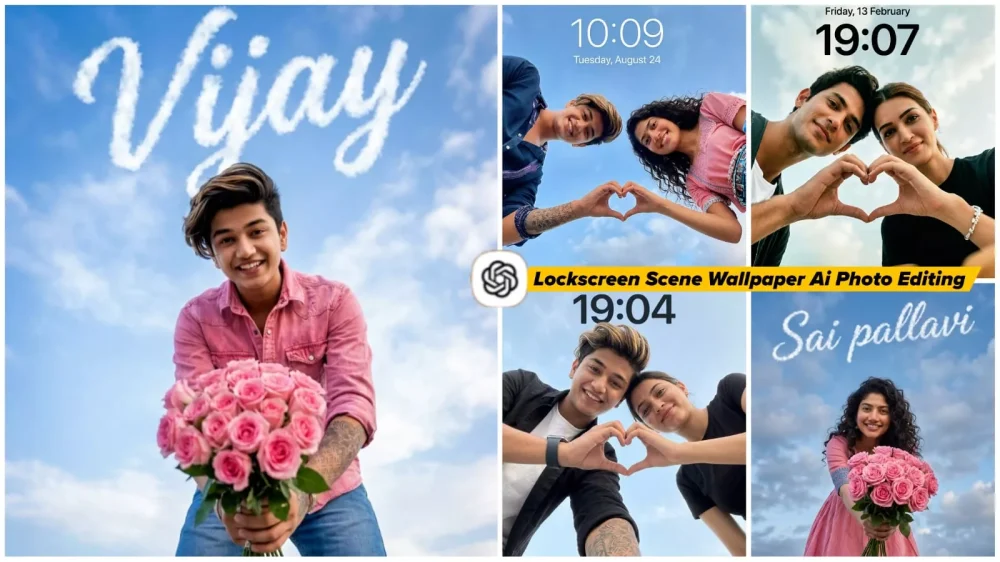
What exactly is “Lock Screen Editing”? Let’s explore this concept together. When you set a photo as your phone’s lock screen, you invariably see the current time displayed at the top, along with various notifications. Nowadays, a popular trend involves creating images designed to look like a mobile screen—complete with the time displayed at the top—featuring a unique wallpaper. For instance, you might use a photo where it appears as though you are offering a flower directly toward the viewer. This creates a visually appealing effect; essentially, the moment someone unlocks the screen, it looks as if the person in the image is presenting a flower to them. It is a delightful visual experience, which is precisely why this trend has gained such popularity. In this very article, we will learn how to create these types of images using AI prompts.
Why This Trend Has Become So Popular
You might be wondering why this trend has become so popular. Well, the reason people love this trend is that the content is incredibly relatable; it resonates with everyone on a personal level. Since almost everyone sets their own photo as their lock screen wallpaper, they naturally want something unique to display there—and these photos fit the bill perfectly. Furthermore, the results produced are remarkably realistic, Often creators baffle viewers by creating such images. Some might feel that this isn’t possible, but in today’s world, thanks to the power of AI, all of this is entirely achievable. The final output boasts a clean and aesthetic look, and the best part is that you can easily create these images yourself.
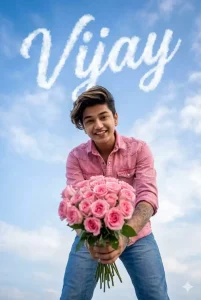
Without changing the facial features of above image man ,create an ultra realistic extreme low angle ground level point of view portrait of man standing .he should bend towards the camera .he should be showing pink rose bouquet towards camera .he should be in smile .he should wear pink denim button down shirt and blue jeans .only clouds background.There should be wordings in English font "ADD YOUR NAME" in the form of white clouds in sky .wordings should be slanting running letters . composition should exactly match such that wordings should form exactly from clouds .pls don't make spelling mistakes in .no other things /objects/floorings visible .aspect ratio 2:3 . preserve exact face of the uploaded image man.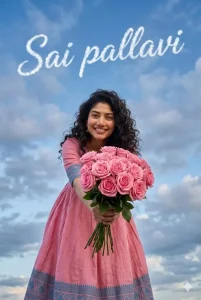
Without changing the facial features of above image woman ,create an ultra realistic extreme low angle ground level point of view portrait of woman standing .she should bend towards the camera .she should be showing pink rose bouquet towards camera .she should be in smile .she should wear anarkali pink with blue border design churidar. Her hair is open .only clouds background.There should be wordings in English font "Sai pallavi" in the form of white clouds in sky .wordings should be slanting running letters . composition should exactly match such that wordings should form exactly from clouds .pls don't make spelling mistakes in .no other things /objects/floorings visible .aspect ratio 2:3 . preserve exact face of the uploaded image woman.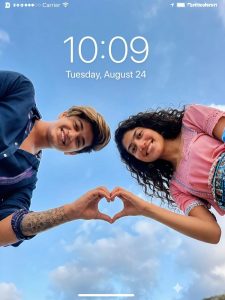
Use the uploaded selfie/selfies as the ONLY identity reference. Do not invent or change faces.Preserve exact face structure - face shape, jawline, nose, eyes, lips, forehead, skin tone, facial hair, skin texture, and natural smile.Keep real imperfections.Do NOT beautify, stylize, smooth skin, slim, reshape, or enhance features.Create a realistic SMARTPHONELOCK SCREEN WALLPAPERCreate a realistic SMARTPHONE LOCK Camera &Angle:Low-angle shot from below, as if the phone is placed beneath the subjects.Wide camera distance.Medium-wide framingUpper body visible.NO zoom.NO portrait-mode blurPose:Two people standing close together, looking down at the camera, forming a heart shape together with their -hands in the foreground.hands in the foreground. Natural, casual, unposed expression.Framing:Centered subjectsHands forming the heart clearly visible.Enough empty space above heads for lock screen text.Background:Open sky with soft daylight and light clouds.Natural colors only. No dramatic or cinematic skyLighting:Natural daylight.Slight uneven lighting like a real phone photo.No studio light.No glow.Style & Texture: Raw phone-camera realism.Natural skin texture. a Slight realistic noisel grain. Balanced contrast. No filters.Lock Screen Ul:iPhone-stvle lock screen lavoutLarge centered time and date visible at the top.Wallpaper-style composition, not edited text.
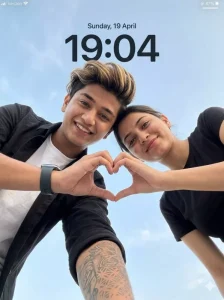
Detailed fabric, and crisp environment clarity.

ASPECT RATIO
3:4 vertical

SCENE
Open outdoor environment with a clean, minimal sky background.
Soft light blue sky with subtle natural clouds filling the entire frame.
No buildings, no objects, no distractions.

SUBJECT
A couple leaning toward the camera from above, captured in a low-angle perspective, creating a modern selfie-style composition.
Framing must clearly show both faces and hands.

FACE & IDENTITY RULES (IMPORTANT)
Faces must remain fully natural and identity-preserved.
Do NOT beautify, reshape, or smooth skin.
Maintain real human imperfections (pores, texture, subtle asymmetry).
Works for any couple.

POSE (STRICT)
Both subjects leaning slightly forward toward the camera
Heads tilted slightly inward, close to each other
Each subject one hand extended downward toward camera
Fingers forming a clear heart shape in the centre frame (thumbs + fingers touching)
Direct eye contact with camera

EXPRESSION
Soft natural happy smiles (IMPORTANT)
Natural, warm, romantic, friendly vibe
No exaggerated expressions

OUTFIT (IMPORTANT)
Female: simple, minimal black t-shirt (soft fabric, natural drape)
Male: white inner t-shirt with black casual shirt (natural folds), optional smartwatch
Clothing must look real with visible texture and folds

LIGHTING
Natural daylight from front-top direction
Soft, even illumination on both faces
No harsh shadows
Natural highlights on skin (cheeks, forehead)
Balanced exposure with realistic tones

BACKGROUND
Full sky visible (light blue + soft clouds)
Clean minimal composition
No distractions

CAMERA & COMPOSITION (STRICT)
Low-angle shot (camera placed below, pointing upward)
Close-up framing (faces + hands clearly visible)
50mm realistic lens perspective
Heart shape perfectly centered
Ultra-sharp focus on faces, hands, and sky
NO blur anywhere

STYLE
Hyper-realistic outdoor couple photography
Modern, clean, social media aesthetic
Natural color grading (no overprocessing)

LOCKSCREEN UI OVERLAY
Top center: “Sunday, 19 April” (minimal iOS-style font)
Below: large bold time “19:04”
Top left: signal icon + “Verizon”
Top right: battery icon (47%)
Clean, subtle smartphone lockscreen overlay

NEGATIVE PROMPT
blur, motion blur, depth of field, soft focus, background blur, CGI look, cartoon style, plastic skin, distorted hands, extra fingers, extra hands, wrong heart shape pose, bad anatomy, identity change, watermark, low resolution
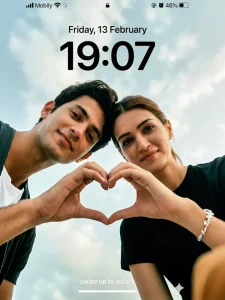
".Realistic smartphone lock screen wallpaper, 9:16 vertical. Low-angle shot from below, phone beneath them, medium-wide, upper body visible. One boy 64K DSLR-quality shot resolution Ultra-hyperrealistic cinematic using a real person’s photo as the exact identity reference image, preserve the subject’s facial structure, proportions, asymmetry, skin texture, pores, and natural imperfections with no beautification or facial alteration & Actress Kriti Sanon close together, looking down, Their hands meet in the center foreground forming a heart shape with thumbs and index fingers, sharply in focus, natural casual expressions. soft smiles,  Girl in black t-shirt. Outfits exactly same as reference. Open sky background, soft daylight, light clouds. No zoom, no blur, no filters. Raw iPhone realism, rataio 9:16
Camera, Optics & Depth of Field: Shot on a 50mm–85mm portrait lens, wide aperture f/1.8–f/2. Extremely shallow depth of field with eyes, eyelashes, and sunglasses in razor-sharp focus, while hair, ears, and background fall into a soft cinematic blur. Natural perspective compression, no distortion.
Texture & Atmosphere: Visible organic film grain, finely detailed skin texture, subtle micro-contrast, and a slightly dusty atmosphere catching the light for added cinematic depth. No plastic skin, no over-smoothing. Color & Grading: Professional cinematic color grading with cool green shadows, warm skin highlights, controlled saturation, deep blacks, and soft highlight roll-off. Editorial tonality inspired by high-end fashion magazines and arthouse cinema. Overall Style: Modern, minimalist, high-detail cinematic composition. Ultra-realistic textures, premium fashion-editorial aesthetic, dramatic yet restrained mood, photographed like a professional fashion campaign still rather than a casual portrait. Octane render, Ultra-hyperrealistic & Unreal Engine 5. "", smartphone lock‑screen screenshot, iOS‑style UI overlay, .Clean natural daylight, phone camera look, slight wide‑angle perspective. Add lock‑screen UI text exactly: at top center small black text ‘Friday, 13 February’; below it very large bold black time ‘19:07’. Top status bar: left text ‘Mobily’ with signal icons; right side small icons and black text ‘46%’ with battery icon; small lock icon centered near the top. Bottom center small white text ‘swipe up to unlock’ and a thin white home indicator bar under it. Realistic screenshot appearance, crisp UI typography, no extra graphics.”"
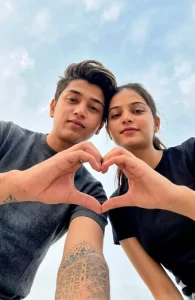
Create a hyper-realistic smartphone lock-screen wallpaper (9:16 vertical) using the uploaded photos only as identity reference, with a 100% exact face match and no facial changes.
Camera: low-angle shot from below, phone placed beneath, medium-wide frame, upper body visible, no zoom, no blur.
Composition: One boy and one girl standing very close, looking down at the camera, hands in the foreground forming a clear heart, natural soft-romantic expressions.Outfits (changed only):
Boy: Luxury fitted black/charcoal designer satin or knit top, modern tailoring
Girl: Luxury black designer t-shirt or chic top, elegant premium fabric
Background: open sky, soft daylight with light clouds.
Style: raw iPhone realism, ultra-realistic, cinematic yet natural.
Quality: real skin texture, real shadows.
No CGI, no filters, no artificial beauty — pure realistic smartphone photography only.
How To Create the Same Type of Image
So, how exactly do you create edits like this? Well, you can simply follow the steps outlined here. This article provides a few straightforward steps; Follow them, and you will be amazed by the excellent results you achieve. First, you need to copy one of the prompts from this article—whichever one appeals to you most. The article features prompts in various styles, each accompanied by a sample image demonstrating the specific type of photo that will be generated. Simply copy the prompt that best suits your preference.
Next, scroll down to find the “Create Image” button, which contains an embedded link to ChatGPT. You can use this link to navigate directly to the website, or if you prefer using the mobile app, you can perform the same process there. We are currently utilizing ChatGPT for this process because it consistently delivers the best results available right now. Begin by pasting your chosen prompt into the input field. Then, click the “+” icon to upload a reference photo. Finally, hit the “Generate” button; in just a few seconds, your stunning new image will be ready!
What Exactly Are The Requirements For This?
Let’s take a look. First and foremost, regarding the necessary tools, you will need access to an image generation model—such as ChatGPT or Google Gemini. Additionally, you will need to provide a reference image. Specifically, you will need a reference photo that illustrates the particular style or aesthetic you desire for your final image. The purpose of this reference photo is to allow the model to capture the unique characteristics of your facial features. It thoroughly analyzes your face to ensure that, in the newly generated image, your facial likeness is accurately and faithfully preserved. Subsequently, it generates your photo by adjusting and incorporating all the specific details provided in the prompt, tailoring the output accordingly.
Conclusion
We hope you enjoyed creating this edit, as we put our absolute best effort into it. Our goal is to entertain you—and the entire internet—while teaching you the fundamentals of editing. If you liked this edit, please tell us in the comments; we will continue bringing you more amazing edits just like this—content that We guarantee you will love it, and that will help your videos go viral.