Instagram is currently trending with glowing, cinematic photo edits that transform ordinary pictures into radiant, eye-catching images. Many people are using a special Instagram filter to achieve this look, but it isn’t available to everyone. The good news is that there’s an alternative method you can use to create the same effect.
In this guide, we’ll show you a prompt-based approach for generating these stunning edits. Using ChatGPT and the right prompts, you can recreate the glowing Lofi Dusk style on your own photos. We’ll walk you through the full process step by step, including the tools you need and the exact prompts to use for the best results.
Details of Instagram Lofi Dusk Filter AI Photo Editing Prompts
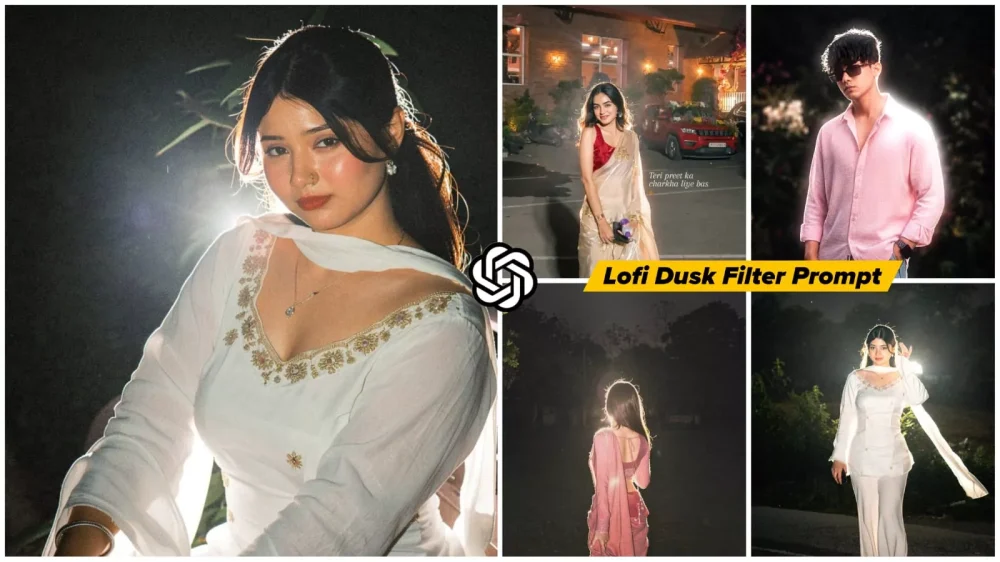
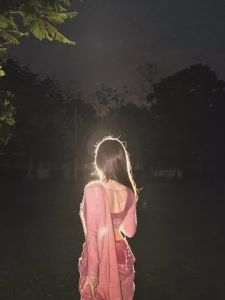
The Lofi Dusk editing style is known for its soft, cinematic glow and dreamy atmosphere. One of its standout features is the ambient background lighting, which creates a subtle rim light around the subject, making the body appear outlined with a radiant glow.
The face also has a luminous effect, while the background remains dark to make the glow stand out more dramatically. This creates an ethereal, cinematic look that feels both stylish and artistic.
Lighting themes in this style often include sunset tones, moody evening scenes, or dramatic nightscapes. In this particular trend, the effect is mostly created using a night-style aesthetic, giving photos a glowing, atmospheric, and visually striking appearance.
Why Is This Photo Editing Style Going Viral?
By now, you may already understand why this editing style has become so popular, but let’s break it down. The biggest reason behind its viral success is its eye-catching and aesthetic appeal. Millions of photos are uploaded to Instagram every day, but the ones that stand out are those that instantly grab attention. This editing style does exactly that with its glowing effects, cinematic color tones, and dark, dramatic backgrounds.
Another reason for its popularity is that it perfectly matches the current aesthetic photography trend that is dominating social media. In the past, users had to rely on Instagram’s filter section to find a similar effect, but that option was not available to everyone. That was the biggest challenge. Now, with AI-powered editing tools, you can create the same look much more easily—just upload your photo, apply the prompt, and the app can generate the effect in seconds.
Understand How to Create This Photo
The first thing you need is access to ChatGPT. Today, you can create professional-quality photo edits like this simply by using AI prompts. While other tools like Google Gemini can also generate images, ChatGPT has been delivering better results for this specific editing style.
The process is simple: first, copy the editing prompt, then open ChatGPT and paste it into the chat. After that, upload a simple photo to use as your reference image.
The AI will not completely replace your background or drastically alter your original photo. Instead, it enhances the existing image by adding stylistic elements such as a dark cinematic background, glowing lighting effects, and soft ambient highlights. Your original composition remains intact, while the AI seamlessly applies the dramatic lighting and aesthetic glow to create a professional, visually striking result.
Lofi Dusk Filter AI Photo Editing Prompts
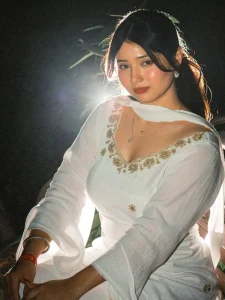
Transform the uploaded image into a cinematic “Lofi Dusk” Instagram aesthetic portrait. Preserve the exact same real person, face, hairstyle, skin tone, outfit, body proportions, pose, expression, and accessories with full identity accuracy.
Create a dark moody nighttime atmosphere with a deep muted background fading into near-black shadows. Add a strong glowing backlight directly behind the subject, creating a bright white rim light around the hair, shoulders, and body edges. Combine this with subtle direct front flash lighting for a realistic DSLR flash effect.
Use high contrast cinematic lighting with soft peachy skin tones, warm highlights, deep shadows, slight overexposed glow around bright areas, and realistic low-light ambience. Add soft bloom, halation, tiny specular highlights on skin, subtle lens flare, and atmospheric haze.
Apply authentic vintage digital-camera texture: fine film grain, soft noise, low-light sensor grain, slight chromatic softness, muted blacks, faded dark tones, and nostalgic early-2000s lo-fi mood.
Background should remain dark, blurry, and atmospheric with soft bokeh lights and faint silhouettes, giving a dreamy dusk/night vibe. Keep the image ultra realistic and cinematic, like an editorial flash photograph shot on an 85mm DSLR lens at night.
Style keywords: Instagram Lofi Dusk filter, cinematic flash photography, night portrait, grainy aesthetic, soft bloom, rim light glow, analog digital camera texture, moody dusk tones, realistic skin texture, shallow depth of field, high contrast, low-light photography, premium Instagram aesthetic, photorealistic, ultra detailed, 4K.
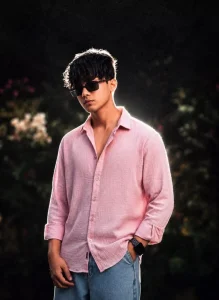
Relight image. Background: Deep and muted, darker tone at the top, grainy.
Lighting: Bold night-flash aesthetic combining natural light with direct front-facing flash. Tiny highlights. Strong backlighting creating a brilliant white rim light around the subject, with a soft fill light from the front. Cinematic high-contrast mood. Skin rendered with gentle peachy tones.
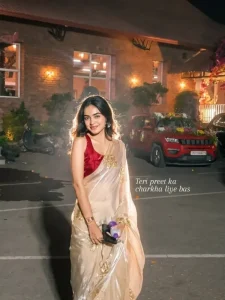
Apply an ethereal lighting filter to photo while fully preserving every original detail of the photo unchanged except for lighting, glow, and color mood. Add diffused sunbeams striking the subject’s skin, creating a glowing highlight on cheekbones, nose bridge, lips, and hair strands. Maintain clear separation between bright sunlit areas and soft, deep shadows to create a cinematic high-contrast mood. Inject subtle lens bloom, light haze, and a thin layer of atmospheric glow around the face and shoulders. Render skin with luminous translucency and gentle peachy tones. Enhance stray hair strands backlit by sunlight. Color-grade with slightly lowered saturation, and gentle film-like grain. Keep the overall background intact but allow sunlight flares and soft bokeh to wrap naturally around the subject. The result should look like a soft, ethereal daydream—sunlit, delicate, and cinematic.
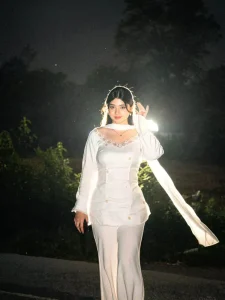
Create a dark moody nighttime atmosphere with a deep muted background fading into near-black shadows. Add a powerful glowing backlight directly behind the subject, creating an intense white rim light around the hair, shoulders, arms, and full body outline.
Add a soft luminous aura surrounding the entire body, especially around the edges of the clothes, hair, hands, and legs, creating a dreamy glowing silhouette effect like cinematic night-flash photography. The glow should feel natural and atmospheric, not fantasy or neon. Include soft bloom diffusion, light bleeding, halation, and subtle mist around bright areas to create that glowing body effect.
Combine this with subtle direct front flash lighting for a realistic DSLR flash aesthetic. Use high contrast cinematic lighting with warm peachy skin tones, soft highlights, deep shadows, slight overexposed glow on white clothing, and realistic low-light ambience.
Add authentic vintage digital-camera texture: visible fine film grain, low-light sensor noise, faded blacks, muted dark tones, soft contrast, slight haze, and nostalgic Y2K lo-fi mood.
Background should remain blurry, dark, and atmospheric with faint silhouettes, soft bokeh lights, and ambient dusk/night tones. Keep the image ultra realistic and cinematic, like an editorial night portrait captured on an 85mm DSLR lens with flash photography.
Style keywords: glowing body aura, cinematic rim light, bloom glow, halation effect, soft flash diffusion, dreamy silhouette glow, Instagram Lofi Dusk filter, CCD camera aesthetic, disposable camera flash, grainy night portrait, moody dusk tones, realistic skin texture, shallow depth of field, photorealistic, ultra detailed, 4K.
Use the exact person, face, hairstyle, skin tone, facial structure, body proportions, expression, and clothing from the reference image without changing anything. The final image must fully preserve the real identity of the person who uploads the photo. Keep the same hair, beard, eyes, lips, jawline, skin texture, pose style, accessories, and outfit exactly as they appear in the original image.

Do not replace or redesign the clothes. Keep the exact same outfit from the uploaded photo with identical colors, fabric texture, folds, fit, branding, and styling. The image should feel like the same real person captured in a cinematic professional photoshoot, not a different model.

Apply only a cinematic visual effect and enhanced photography aesthetics while preserving complete realism and identity accuracy. Create a dramatic nighttime portrait with white backlighting behind the subject, producing a glowing white rim light around the hair and shoulders. Use moody cinematic lighting, soft shadows, realistic skin texture, shallow depth of field, subtle film grain, and natural color grading.

Background should be dark and atmospheric with soft blurred crowd silhouettes and ambient lights, giving a concert or live-event vibe. Keep the pose natural, relaxed, and candid. The person should look authentic and realistic, exactly matching the uploaded reference photo.
Photography style: ultra-realistic DSLR portrait, 85mm lens, cinematic framing, realistic skin pores, high contrast lighting, premium Instagram aesthetic, editorial fashion photography, photorealistic, ultra detailed, 4K quality.
What Is the Identity of This Editing?
This editing style is defined by several unique visual elements, but its most noticeable feature is the soft face glow. This glowing effect gives the subject a radiant and polished appearance that instantly makes the photo stand out. Unlike ordinary filters, the glow in this style looks subtle yet professional, creating a look that feels as if the image was captured by an expert photographer.
Another key characteristic of this editing style is its night-shift cinematic aesthetic. The photo often features moody dark tones, soft ambient lighting, and a balanced glow that creates a premium visual effect. You may also notice a vintage green tint in the color grading, which adds a stylish and artistic touch to the overall image.
This editing style also creates a calm, emotional, and cinematic mood, making the photo feel more expressive and visually appealing. The combination of glowing highlights, vintage tones, and dramatic night-style lighting gives the image a polished, professional-quality finish.
Conclusion
This Instagram editing trend has become popular because it offers a stunning cinematic look without requiring advanced photo editing skills. If you like this style, you can easily recreate it using AI prompts as an alternative to traditional Instagram filters.
For users who already have access to the filter on Instagram, you can apply it directly from the Effects section. But if the filter is unavailable, this prompt-based AI method provides a simple and effective way to achieve the same glowing, aesthetic result.